Wear time stays visible
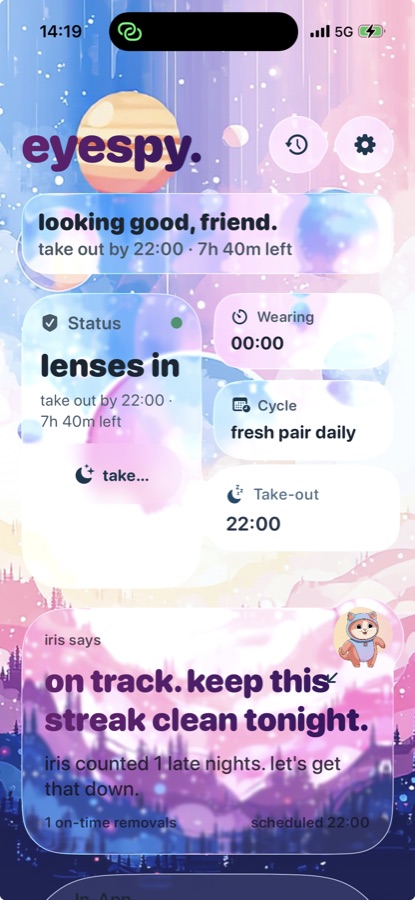
The same tap starts the wear timer, so you can see how long your lenses have been in.
Private patient-page preview
This practice does not have a registered private preview.
Return to EyeSpyTap once when they go in. EyeSpy tracks the time, reminds you when it is time to take them out and tells you when it is time for a fresh pair.
Private preview - this is what patients will see. Your practice's working phone links and QR codes are already prepared for you. The moment checkout is complete, the keys land in your inbox - ready to share whenever you choose.
Reminder behavior
Set your take-out time once. EyeSpy reminds you as it approaches. If your lenses remain marked in, optional Night Guard adds two extra alerts. Each can be snoozed for 20 minutes.
The same tap starts the wear timer, so you can see how long your lenses have been in.
EyeSpy tells you when it is time for a fresh pair.
Use an optional morning reminder when it helps your routine.
Your phone
Reading this on a computer? Scan the matching QR code with your phone.
Privacy
Your practice sends the invitation without giving EyeSpy a name, phone number, email address or medical record.
Your patient-ready page
Working links and QR codes replace the previews, and every owner-only label disappears.
02 · Patient view complete
You have seen how EyeSpy follows up. Next, see why take-out timing matters.
Already prepared
Your patient page, practice connection and ready-to-send messages are already prepared and tested. The moment checkout succeeds, the working keys land in your inbox. Try EyeSpy on your own phone. If, during the next fourteen days, you feel anything less than proud to share it with the contact-lens patients you choose, tell Kai. The full $900 comes back - no interrogation. The risk is on the work - not on you. You choose when to share.